Feature: Community Manager Just Got a Major Upgrade

We’re excited to announce a significant enhancement to the Community Manager on Gametize!
For those unfamiliar, the Community Manager is our built-in discussion forum system, where:
-
Boards are created by administrators
-
Boards contain many posts
-
Posts can contain many comments
-
Players participate through posts and comments
What Was Previously Available?
For the longest time, administrators in the CMS could only:
-
Create and update boards
-
Moderate posts and comments
-
Publish or unpublish boards and posts
While this worked well for moderation purposes, administrators and moderators themselves could not actively participate in discussions through the CMS.
What’s New?
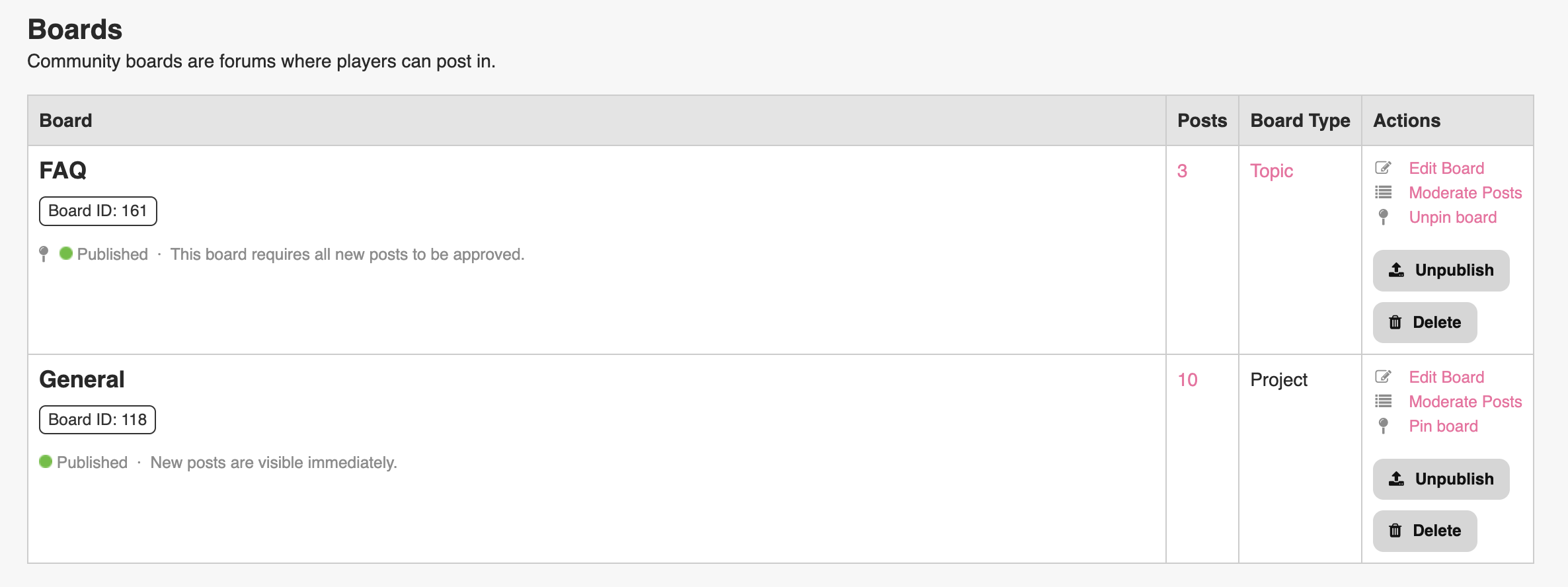
We are now rolling out support for administrators and moderators to:
-
Create and update posts
-
Create and update comments
-
Pin posts (make them sticky to the top)
-
Pin boards (make them sticky to the top)
-
Move posts to another board (available as part of the update post function)
These new functions are available to both:
-
Project Administrators
-
Project Moderators
Where to Access These Features
Navigate to:
Project Tools > Community Manager
From there:
-
“New Board” is available from the Boards List page
-
“New Post” is available from the Posts List page after clicking “Moderate Posts”
-
“Edit Post”, “Edit Comment”, “Pin Board”, and “Pin Post” are available under the Actions column of their respective items
What’s Coming Next?
This is not the end of our Community Manager improvements.
Coming in a later update will be the ability to manage embedded media for both posts and comments, including:
-
Adding media
-
Updating media
-
Deleting media
We hope these updates help administrators and moderators build more engaging and better-managed communities on Gametize!
Please sign in to leave a comment.
Comments
0 comments